


Converter
What is Converter
A converter is a device or software that transforms data or signals from one format, protocol, or standard to another. It enables compatibility between different systems, allowing them to communicate and exchange information effectively. Converters are commonly used in various fields, including electronics, telecommunications, and computing, to bridge the gap between incompatible technologies. They come in different forms, such as hardware devices, adapters, or software programs, each tailored to specific conversion requirements.
Advantages of Converter
Compatibility
Converters enable compatibility between devices, systems, or networks that use different formats, protocols, or standards. They allow seamless communication and interoperability, regardless of the differences in technology, thereby facilitating efficient data exchange and collaboration.
Flexibility
Converters offer flexibility in adapting to changing technological requirements and environments. They can accommodate a wide range of input and output formats, allowing users to connect diverse devices or systems without being limited by compatibility constraints.
Interconnectivity
Converters enhance interconnectivity by bridging gaps between disparate systems or networks. They enable integration between legacy and modern technologies, enabling smooth transitions and upgrades while preserving existing investments in infrastructure and equipment.
Scalability
Converters support scalability by providing versatile solutions that can be easily scaled up or down to meet evolving needs. Whether it's adding new devices, expanding networks, or upgrading systems, converters offer adaptable solutions that grow with the requirements of the user.
Efficiency
Converters enhance efficiency by streamlining data exchange processes and reducing the need for manual intervention or reconfiguration. They automate the conversion process, minimizing errors and delays, and improving overall workflow efficiency.
Cost-effectiveness
Converters offer cost-effective solutions for achieving compatibility and interoperability between different technologies. Instead of investing in entirely new systems or equipment, users can leverage converters to extend the lifespan of existing infrastructure and maximize the return on investment.


HDMI/Displayport/MINI DISPLAYPORT/VGA/USB Converter
Why Choose Us
Rich experience
Our company has many years of production work experience. The concept of customer-oriented and win-win cooperation makes the company more mature and stronger.
Quality control
We have professional personnel to monitor the production process, inspect the products and ensure that the final product meets the required quality level standards, guidelines and specifications.
Professional team
Our professional team collaborate and communicate effectively with one another, and are committed to delivering high-quality results. They are capable of handling complex challenges and projects that require their specialized expertise and experience.
After-sale service
We respond to all questions within 24 hours and if any emergencies arise, our team is always at your service.
Can Converters be Used for Both Analog and Digital Signals?
They serve as intermediary devices that transform signals from one format to another, facilitating compatibility and interoperability between different types of devices and systems. For example, analog-to-digital converters (ADCs) convert analog signals, such as audio or video, into digital signals suitable for processing by digital devices like computers or digital recording equipment. Conversely, digital-to-analog converters (DACs) perform the opposite function, converting digital signals back into analog form for output to devices like speakers or displays. This versatility allows converters to bridge the gap between analog and digital technologies, enabling seamless communication and integration across diverse platforms and applications.
Are Converters Compatible With Different Standards and Protocols?
Converters are designed to be compatible with a wide range of standards and protocols, making them versatile solutions for bridging compatibility gaps between different technologies. Whether it's converting between analog and digital signals, or adapting signals to different communication standards such as HDMI, VGA, USB, Ethernet, or RS-232, converters are engineered to handle diverse conversion requirements. They ensure seamless interoperability and communication between devices, systems, or networks that utilize varying standards or protocols, facilitating efficient data exchange and integration across different platforms.
How do I Install a Converter?
Ensure that you have the necessary cables and power sources for both the input and output devices. Next, connect the input device to the converter using the appropriate cables, ensuring a secure and stable connection. Then, connect the output device to the converter using another set of cables. If the converter requires external power, plug it into a power source using the provided adapter. Once all connections are made, power on the input and output devices, as well as the converter if necessary. With these steps completed, the converter should be installed and ready to use, facilitating seamless communication and data exchange between the connected devices.
Can Converters be Used to Extend the Range of a Signal?
Converters can be used to extend the range of a signal by converting it into a format that is better suited for long-distance transmission. For example, in the case of audio or video signals, converters can transform analog signals into digital ones, which are less susceptible to degradation over long distances. Signal repeaters or amplifiers can be used in conjunction with converters to further extend the range of the signal.

The main difference between a converter and an adapter lies in their functionality and purpose. A converter is a device or software that transforms data or signals from one format, protocol, or standard to another, enabling compatibility between different systems or devices. It actively modifies the data or signal to ensure proper communication between incompatible technologies. An adapter is a passive device that simply facilitates physical connections between devices with different connectors or interfaces. It does not modify the data or signal but instead provides a bridge between devices with different physical characteristics. While converters actively modify data or signals to achieve compatibility, adapters serve as physical connectors to enable connections between devices with different interfaces.
Converters are often plug-and-play devices, meaning they can be easily connected to compatible devices without the need for additional software installation or configuration. Once plugged in, converters typically automatically detect the input signal and convert it to the desired output format. This user-friendly feature makes converters convenient to use, especially for non-technical users who may not have extensive knowledge of the underlying technology. It's essential to ensure that the converter is compatible with the devices and signals being converted to ensure seamless operation. While most converters are plug-and-play, some may require minor setup or configuration adjustments depending on specific requirements or preferences.

Can Converters be Used With Mobile Devices?
Converters can be used with mobile devices to extend their functionality and compatibility with various accessories and peripherals. For example, users can utilize converters to connect their smartphones or tablets to external displays, projectors, keyboards, mice, USB flash drives, and other devices that use different connectors or standards. Converters such as USB OTG (On-The-Go) adapters enable mobile devices to act as hosts, allowing them to interface with a wide range of USB peripherals. Additionally, converters for audio connections, such as USB-C to 3.5mm headphone adapters, enable users to use traditional audio accessories with smartphones lacking dedicated audio jacks.
Are There Converters for Connecting USB Accessories to Smartphones?
Converters are available for connecting USB accessories to smartphones, enhancing their functionality and compatibility. These converters typically feature USB-A, USB-C, micro USB, or Lightning connectors on one end and a smartphone-compatible port on the other. They allow smartphones to connect to a wide range of USB accessories, including keyboards, mice, game controllers, USB drives, and more. By providing compatibility between different USB interface types, these converters expand the versatility of smartphones, enabling users to utilize a broader range of accessories for productivity, entertainment, and convenience. Whether it's connecting a keyboard for typing efficiency or a USB drive for file storage and transfer, these converters offer enhanced connectivity options for smartphone users.
Types of Converter
Analog-to-digital converter (ADC)
An ADC converts analog signals, such as voltage or current, into digital data that can be processed by digital systems like computers or microcontrollers. It samples the analog signal at regular intervals and assigns digital values to represent the sampled analog signal's amplitude.
Digital-to-analog converter (DAC)
A DAC performs the opposite function of an ADC by converting digital data into analog signals. It takes digital values stored in memory and generates corresponding analog output voltages or currents. DACs are utilized in various applications, including audio playback, video processing, waveform generation, and control systems.
Voltage converter
Voltage converters, also known as voltage regulators or voltage inverters, are devices that convert electrical voltage from one level to another. They can step up (increase), step down (decrease), or invert (change polarity) voltage levels to match the requirements of different electronic devices or systems.
Frequency converter
Frequency converters alter the frequency of electrical signals while maintaining their voltage and waveform characteristics. They can convert alternating current (AC) power from one frequency to another, enabling compatibility between power systems operating at different frequencies.
Signal converter
Signal converters transform one type of electrical signal into another type, such as analog to digital, digital to analog, or between different analog signal formats. They ensure compatibility and interoperability between devices or systems with different signal requirements.
Media converter
Media converters convert signals between different types of transmission media, such as copper wire, fiber optic cable, or wireless signals. They enable connectivity between devices or networks with different physical layer interfaces, allowing data transmission over longer distances or in challenging environments.
Material of Converter
Converters are commonly made from a variety of materials, including plastic, metal, and electronic components. The outer casing or housing of a converter is typically constructed from durable and lightweight materials such as ABS plastic or aluminum, providing protection for the internal circuitry and components. The electronic components inside the converter may include integrated circuits, resistors, capacitors, and transformers, which are assembled onto a printed circuit board (PCB). Converters may incorporate shielding materials to minimize electromagnetic interference (EMI) and radio frequency interference (RFI), enhancing signal integrity and stability.
Application of Converter
Industrial automation
Converters are integral to industrial automation systems for interfacing between different sensors, actuators, and control systems. They facilitate communication between devices using different communication standards or protocols, enabling seamless integration and interoperability.
Consumer electronics
Converters are found in a wide range of consumer electronics products, including TVs, DVD players, smartphones, and digital cameras. They are used for format conversion, signal processing, and interface adaptation to provide seamless connectivity and compatibility with different devices and media formats.
Medical devices
In medical devices and equipment, converters are used for signal processing, data acquisition, and interface conversion. They enable communication between medical sensors, monitors, and diagnostic equipment, ensuring accurate measurement and monitoring of patient health parameters.
Aviation and aerospace
Converters are employed in aviation and aerospace systems for communication, navigation, and data processing. They enable conversion between different avionics interfaces, protocols, and signal formats, ensuring reliable operation and safety in aircraft and spacecraft applications.
Components of Converter
These components may include input interfaces to receive the incoming signal or data, processing units to analyze and convert the input, output interfaces to transmit the converted signal or data, and power supply units to provide the necessary energy for operation. Converters may incorporate circuitry or algorithms for signal conditioning, error correction, and protocol conversion to ensure accurate and reliable conversion. These components work together to facilitate seamless compatibility and interoperability between different systems or devices, enabling efficient data exchange and communication across diverse technological environments.
How do I Know if I Need a Converter?
Determining whether you need a converter depends on the specific scenario and the compatibility of your devices or systems. If you encounter issues with connectivity or communication due to differences in formats, protocols, or standards between your devices, a converter may be necessary. Common signs that indicate the need for a converter include incompatible connectors, signal distortion, or the inability to transfer data effectively between devices.
What Factors Should I Consider When Choosing a Converter?
Input and output compatibility
Ensure that the converter supports the input and output formats, protocols, and standards required for your application. It should be compatible with the devices, systems, or networks you intend to connect.
Conversion quality
Consider the quality of conversion offered by the converter, including signal integrity, accuracy, and fidelity. Choose a converter that maintains the integrity of the converted signal without introducing significant distortion or loss.
Conversion speed
Evaluate the conversion speed of the converter, especially for real-time applications or time-sensitive operations. A faster conversion speed can improve efficiency and responsiveness, particularly in high-demand environments.
Resolution and bit depth
For video or audio signals, consider the resolution and bit depth supported by the converter. Choose a converter that can handle the required resolution and bit depth to ensure high-quality output.
Compatibility with devices
Check the compatibility of the converter with the devices or systems you plan to connect. Ensure that it supports the connectors, interfaces, and protocols used by your devices to avoid compatibility issues.
Power requirements
Determine the power requirements of the converter, including voltage, current, and power source compatibility. Ensure that the converter can be powered using available power sources or adapters, especially in remote or mobile applications.

Ensure that all connections are secure and correctly plugged in. Check for any visible damage or wear on the converter or cables. Try using the converter with different devices or cables to identify if the issue is with a specific component. Verify compatibility between the converter and your devices, ensuring they support the same standards and protocols. If possible, update the firmware or drivers of the converter to the latest version. Test the converter in different environments to rule out any interference or environmental factors.
Are there Converters for Different Types of Connectors?
There are converters available for different types of connectors, catering to various compatibility needs in electronics and technology. These converters facilitate seamless connections between devices with different connector types, such as USB-A to USB-C, HDMI to DisplayPort, VGA to HDMI, and more. They typically feature a compact and lightweight design, making them convenient for travel or use in different environments. Converters may also support bidirectional conversion, allowing for flexibility in adapting to different devices and setups. Whether you need to connect legacy devices to modern equipment or vice versa, converters offer a versatile solution to bridge the gap between different connector standards and ensure compatibility across a range of devices and systems.
Maintenance Tips for Converter
Regular cleaning
Regularly clean the converter and its connectors using a soft, dry cloth to remove dust, dirt, and debris. Avoid using harsh cleaning agents or solvents, as they may damage the converter's components.
Inspect for damage
Periodically inspect the converter for any signs of physical damage, such as cracks, dents, or frayed cables. If any damage is detected, discontinue use immediately and replace the converter to prevent further issues.
Secure connections
Ensure that all connections between the converter and devices are secure and properly seated. Loose connections can result in intermittent connectivity issues or signal degradation.
Avoid overloading
Avoid overloading the converter by connecting too many devices or exceeding its maximum rated capacity. Overloading can lead to overheating, voltage fluctuations, and potential damage to the converter and connected devices.
Proper storage
Store the converter in a cool, dry place away from direct sunlight and extreme temperatures. Avoid bending or twisting the cables, as this can cause internal damage and affect performance.
Things to Note When Using Converter
Compatibility
Ensure that the converter is compatible with both the input and output devices or signals. Check the specifications of the converter to verify its compatibility with the devices you intend to connect.
Power requirements
Be mindful of the power requirements of both the input and output devices. Ensure that the converter can handle the power demands of the devices to prevent overheating, damage, or malfunction.
Signal quality
Pay attention to the signal quality when using a converter, especially for audio, video, or data signals. Poor-quality converters may introduce signal degradation, distortion, or interference, affecting the overall performance and user experience.
Connector types
Verify that the converter has the appropriate connector types for both the input and output devices. Check for compatibility with connectors such as USB-C, HDMI, VGA, DisplayPort, etc., to ensure seamless connectivity.
How Does a Converter Work?
A converter works by transforming signals or data from one format to another, allowing compatibility between different devices or systems. It typically involves converting analog signals to digital or vice versa, or converting between different digital formats. The converter processes the input signal, applies necessary adjustments or transformations, and produces an output signal in the desired format. This process may involve analog-to-digital conversion (ADC), digital-to-analog conversion (DAC), or protocol conversion, depending on the specific requirements of the application. Converters may also include additional features such as signal amplification, noise reduction, or error correction to ensure accurate and reliable conversion.
Can Converters be Used for Power Conversion?
Converters can be used for power conversion, transforming electrical energy from one form to another. They are commonly employed to convert alternating current (AC) to direct current (DC) or vice versa, enabling compatibility between different power sources and devices. For instance, AC/DC converters are widely used in power adapters for electronic devices such as laptops, smartphones, and chargers, converting household AC power to the DC power required by these devices. Similarly, DC/DC converters are utilized in various applications to step up or step down voltage levels, ensuring the proper supply of power to sensitive components. Converters play a crucial role in power management and distribution, providing efficient and reliable conversion of electrical energy to meet the requirements of different devices and systems.
Our Factory
Otechkabel is a professional manufacture which has 10years experiences in USB, VGA, HDMI, DVI, SATA cables and Cable accessories production.
Otechkabel workshop covers an area of 2000 square meters and expand production lines to 20. Even though our oversea sales team established from 2017, we believe that full-hearted servicewith professional solution, stable quality products is the most important part to win customers.


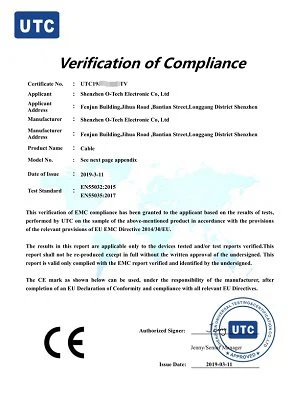
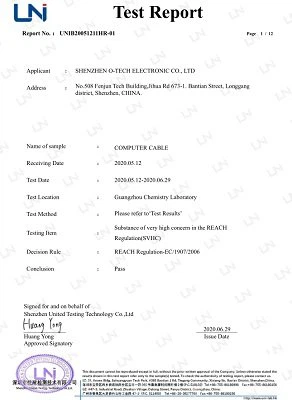
Certifications

FAQ
As one of the most professional converter manufacturers and suppliers in China, we're featured by quality products and competitive price. Please rest assured to buy or wholesale bulk converter made in China here from our factory.
usb to micro usb extension cable, usb b to mini b adapter, lightning to usb printer adapter