


Mini USB Cable
What is Mini USB Cable
A Mini USB cable is a type of USB cable with a smaller connector compared to standard USB cables. It was commonly used in older electronic devices such as digital cameras, MP3 players, and external hard drives. The Mini USB connector features a compact design, making it suitable for portable devices where space is limited. These cables typically have a USB Type-A connector on one end, which plugs into a computer or power adapter, and a Mini USB connector on the other end, which connects to the device.
Advantages of Mini USB Cable
Compact size
Mini USB cables feature a smaller connector size compared to standard USB cables, making them ideal for portable devices with limited space. This compact design allows for easier storage and transportation of devices and cables.
Compatibility
Mini USB cables offer compatibility with a wide range of devices, including older electronic devices such as digital cameras, MP3 players, and external hard drives. They provide a reliable connection for transferring data and charging devices, ensuring seamless interoperability.
Durability
Mini USB cables are known for their robust construction and durability. The connectors are designed to withstand frequent insertion and removal, reducing the risk of damage or wear over time. This durability ensures long-term reliability, even in demanding usage environments.
Versatility
Mini USB cables serve multiple purposes, supporting data transfer, charging, and peripheral connectivity. They can be used to transfer files between devices, charge smartphones or other portable electronics, and connect peripherals such as keyboards, mice, and printers.
Widespread availability
Despite being superseded by newer USB connector standards such as Micro USB and USB-C, Mini USB cables are still widely available and compatible with many legacy devices. This widespread availability ensures continued support for older equipment and accessories, minimizing the need for costly upgrades.
Cost-effectiveness
Mini USB cables are often more cost-effective than newer USB connector standards, making them an economical choice for users with older devices. They offer reliable performance at a lower price point, providing excellent value for money compared to more expensive alternatives.


Why Choose Us
Rich experience
Our company has many years of production work experience. The concept of customer-oriented and win-win cooperation makes the company more mature and stronger.
Quality control
We have professional personnel to monitor the production process, inspect the products and ensure that the final product meets the required quality level standards, guidelines and specifications.
Professional team
Our professional team collaborate and communicate effectively with one another, and are committed to delivering high-quality results. They are capable of handling complex challenges and projects that require their specialized expertise and experience.
After-sale service
We respond to all questions within 24 hours and if any emergencies arise, our team is always at your service.

USB 3.0 ports use a different connector type, typically USB Type-A or USB Type-B, which have more pins and a different shape compared to Mini USB connectors. Mini USB cables are designed for use with USB 2.0 ports and devices, featuring a smaller and simpler connector design. Attempting to use a Mini USB cable with a USB 3.0 port may result in physical incompatibility and unreliable connections, as the connectors are not designed to interface with each other. Therefore, it's essential to use the appropriate cable and connector type for compatibility and optimal performance.
Can I Charge my Smartphone With a Mini USB Cable?
Many older smartphones, particularly those manufactured before the widespread adoption of Micro USB and USB-C connectors, utilize Mini USB ports for charging and data transfer. If your smartphone has a Mini USB port, you can use a compatible Mini USB cable to connect it to a power source, such as a USB charger or a computer, for charging. However, it's essential to ensure compatibility between the cable and the smartphone's charging port to avoid any issues. While Mini USB cables are less common in newer smartphones, they are still widely used in some legacy devices and accessories.
What is the Maximum Data Transfer Speed of Mini USB Cables?
The maximum data transfer speed of Mini USB cables typically depends on the version of the USB standard they adhere to. Mini USB cables can support data transfer speeds of up to 480 Mbps (megabits per second) for USB 2.0 versions. However, it's essential to note that newer USB standards, such as USB 3.0 and USB 3.1, offer higher data transfer speeds of up to 5 Gbps and 10 Gbps, respectively, but Mini USB cables are not compatible with these higher-speed standards. While Mini USB cables are suitable for transferring data at moderate speeds, users requiring faster data transfer rates may need to consider alternative connector standards such as Micro USB or USB-C.
Can Mini USB Cables Transfer Data?
These cables are commonly used to connect devices such as digital cameras, MP3 players, external hard drives, and GPS devices to computers for data transfer. The Mini USB connector features data transfer capabilities, allowing users to transfer files, photos, music, and other data between their devices and computers. It's important to note that the speed of data transfer may vary depending on the specific device, cable quality, and USB port used.
How do I Connect a Mini USB Cable to my Device?
Start by identifying the Mini USB port on your device, which is typically located on the device's body or along its edge. Next, align the Mini USB connector on the cable with the port on your device, ensuring that the connector is oriented correctly. Insert the Mini USB connector firmly into the port, applying gentle pressure until it clicks into place. Make sure the connection is secure to prevent accidental disconnection during use. Once connected, the device should recognize the cable, allowing you to transfer data, charge the device, or perform other functions as needed.
Examine the cable's construction materials, focusing on the durability of the connectors and the thickness of the cable itself. High-quality cables often feature sturdy connectors with gold-plated contacts to resist corrosion and ensure reliable connections. Inspect the cable's insulation and shielding to minimize interference and signal loss during data transmission. Look for cables that comply with industry standards and certifications, such as USB-IF certification, which ensures compatibility and adherence to performance specifications.

Material of Mini USB Cable
The outer casing of the cable is commonly made from PVC (polyvinyl chloride) or TPE (thermoplastic elastomer) to provide insulation and protection against wear and tear. Inside the cable, copper conductors are used to carry electrical signals efficiently, ensuring reliable data transfer and power delivery. The connectors at each end of the cable are often made from molded plastic or metal alloys to provide strength and stability during connection and disconnection.
Application of Mini USB Cable
Digital cameras
Mini USB cables are commonly used to connect digital cameras to computers for data transfer. They allow users to offload photos and videos from their camera's memory card to a computer for editing, storage, or sharing.
MP3 players
Many older MP3 players utilize Mini USB cables for data transfer and charging. Users can sync music files between their MP3 player and computer, as well as recharge the device's battery using the same cable.
External hard drives
Some portable external hard drives feature Mini USB ports for connecting to computers or laptops. Mini USB cables enable users to transfer large amounts of data quickly between the external hard drive and the computer.
GPS devices
Mini USB cables are often used to connect GPS devices to computers for map updates, software upgrades, and data synchronization. This allows users to keep their GPS device's firmware and maps up to date.
Digital voice recorders
Many digital voice recorders come with Mini USB ports for transferring audio recordings to computers. Mini USB cables provide a convenient way to archive, edit, or share recorded audio files with others.
Game controllers
Some gaming peripherals, such as controllers and joysticks, utilize Mini USB cables for connecting to gaming consoles or computers. These cables enable users to enjoy a seamless gaming experience while ensuring a reliable connection between the controller and the gaming device.
Are Mini USB Cables Compatible With Mac Computers?
Mac computers typically feature USB ports that support a variety of USB connector standards, including Mini USB. Users can connect devices such as cameras, external hard drives, and smartphones that utilize Mini USB connectors to their Mac computers for data transfer, charging, or peripheral connectivity. However, with the transition to newer USB connector standards such as USB-C, users may require adapters or dongles to connect Mini USB devices to newer Mac models with USB-C ports. Nonetheless, Mac computers generally support backward compatibility with older USB standards, ensuring continued usability of Mini USB devices with Mac systems.
Are Mini USB Cables Suitable for High-Speed Charging?
Mini USB cables are generally not suitable for high-speed charging compared to newer USB connector standards such as USB-C. While they can provide power for charging various devices like smartphones, cameras, and MP3 players, their charging speeds are typically slower due to limitations in data transfer rates and power delivery capabilities. However, some Mini USB cables may support certain fast charging protocols, such as Qualcomm Quick Charge, depending on the device and its compatibility. While Mini USB cables can charge devices effectively, they may not offer the same level of fast charging performance as newer USB standards.
Are Mini USB Cables Backward Compatible With Older USB Ports?
While Mini USB connectors are physically smaller than standard USB connectors, they maintain compatibility with older USB ports through their pin configuration and signaling protocols. This means that a device equipped with a Mini USB port can still be connected to a computer or other device with a standard USB Type-A port using a Mini USB cable. The backward compatibility ensures that older devices with Mini USB ports can continue to be used with existing USB equipment and infrastructure, without the need for additional adapters or converters.
How are Mini USB Cable Made?
Materials selection
The first step in manufacturing Mini USB cables is selecting the appropriate materials. This includes choosing the conductive materials for the wires, the insulating materials for the cable jacket, and the materials for the connectors and housing.
Wire preparation
The conductive wires used in Mini USB cables are typically made of copper or copper alloys due to their excellent conductivity properties. The wires are often stranded rather than solid to improve flexibility and resistance to bending and fatigue.
Insulation application
Once the wires are prepared, they are coated with an insulating material to protect against electrical interference and prevent short circuits. The insulation material is typically made of PVC (polyvinyl chloride) or TPE (thermoplastic elastomer).
Connector assembly
The connectors used in Mini USB cables are typically made of plastic or metal and consist of multiple components, including the housing, pins, and contacts. These components are assembled using precision molding and machining techniques to ensure a secure and reliable connection.
Cable assembly
The prepared wires are then assembled with the connectors to form the cable assembly. This process involves carefully soldering or crimping the wires to the connector pins and securing them in place with adhesive or strain relief materials.
Testing and quality control
Once the cables are assembled, they undergo rigorous testing to ensure compliance with industry standards and specifications. This includes testing for continuity, insulation resistance, and electrical performance to verify that the cables meet the required quality and performance criteria.
Components of Mini USB Cable
A Mini USB cable typically consists of two primary components: the cable itself and the Mini USB connector. The cable is usually made of insulated wires encased in a protective outer jacket, providing flexibility and durability. These wires transmit power and data signals between devices connected by the cable. At one end of the cable is the Mini USB connector, which features a compact design with a smaller size compared to standard USB connectors. The Mini USB connector consists of pins or contacts that establish a connection with the corresponding port on a device. This connector allows for the transfer of data and power between devices, facilitating tasks such as charging, data transfer, and peripheral connectivity.
What is the Length of the Mini USB Cable?
Mini USB cables are available in standard lengths ranging from a few inches to several feet. The most common lengths are around 3 to 6 feet (approximately 0.9 to 1.8 meters), which provides sufficient flexibility for connecting devices to a computer or power source while still allowing for some mobility. Shorter lengths are also available for more compact setups or when portability is a priority, while longer cables may be preferred for situations where devices are located further apart.
How Does the Mini USB Cable Transfer Audio and Video Files?
The Mini USB cable transfers audio and video files by establishing a data connection between the source device, such as a digital camera or MP3 player, and the receiving device, typically a computer or media player. When the Mini USB cable is connected, data is transmitted through the cable's conductive wires in a digital format. The source device sends the audio and video files as digital data packets, which are then received and processed by the receiving device. The cable acts as a conduit for the data transfer process, ensuring that the audio and video files are transmitted accurately and efficiently between the two devices. Once the transfer is complete, the receiving device can playback or store the audio and video files as desired.
How to Store Mini USB Cable
Coil the cable neatly
When storing a Mini USB cable, coil it neatly to prevent tangles and knots. Start by holding one end of the cable and wrapping it around your hand or a cable organizer in a circular motion. Avoid twisting the cable excessively to maintain its integrity.
Use cable ties or velcro straps
Secure the coiled Mini USB cable with cable ties or Velcro straps to keep it in place. This helps prevent the cable from unraveling and keeps it organized during storage. Make sure not to tie the cable too tightly to avoid damaging the insulation.
Store in a dry and cool environment
Choose a dry and cool environment for storing Mini USB cables to prevent damage from moisture, heat, or sunlight exposure. Avoid storing cables near heat sources, direct sunlight, or areas with high humidity, as these conditions can degrade the cable's insulation and connectors over time.
Protect connectors
Protect the connectors of Mini USB cables by using protective caps or covers, especially if they are not in use for an extended period. This helps prevent dust accumulation, corrosion, or damage to the connectors, ensuring reliable connectivity when needed.
Avoid sharp bends or kinks
Avoid sharp bends or kinks in the Mini USB cable when storing it, as these can weaken the cable's structure and lead to damage over time. Instead, gently loop the cable without applying excessive force or bending it at sharp angles.
Label and organize
Label Mini USB cables with tags or markers to identify their purpose or usage. Organize stored cables in labeled containers, drawers, or cable organizers to easily locate specific cables when needed. This helps maintain order and prevents confusion when managing multiple cables.
Things to Note When Using Mini USB Cable
Alignment
When connecting a Mini USB cable, ensure proper alignment of the connector with the port on the device. Attempting to force the connector into the port at an incorrect angle may damage the port or the cable, leading to connectivity issues or physical damage.
Gentle handling
Handle Mini USB cables with care to avoid damage to the connectors or cables. Avoid pulling or bending the cable excessively, as this can weaken the internal wires and lead to breakage over time. Additionally, refrain from yanking the cable out of the port abruptly, as this can damage the connector or dislodge components inside the device.
Compatibility
Verify the compatibility of the Mini USB cable with your device before use. While Mini USB cables are standard connectors, there may be variations in pin configuration or power delivery capabilities between different devices. Using an incompatible cable may result in improper charging, data transfer issues, or device malfunction.
Data transfer speed
Be aware of the data transfer speed limitations of Mini USB cables. While Mini USB cables are capable of transferring data, they may have lower maximum data transfer speeds compared to newer USB connector standards such as USB 3.0 or USB-C. If high-speed data transfer is essential, consider using a cable with higher data transfer capabilities.
When connected, the Mini USB cable establishes a physical connection between the USB port on a device and the corresponding port on another device or a power source, such as a computer, charger, or power bank. This connection enables the transmission of electrical signals for data transfer, allowing devices to exchange information, such as files, photos, or music. Additionally, the cable facilitates the supply of electrical power from the power source to the connected device, enabling charging or powering of the device. The Mini USB cable's internal wiring and connectors are designed to transmit signals and power efficiently while ensuring durability and reliability, making it a fundamental component in the operation of various electronic devices.
Our Factory
Otechkabel is a professional manufacture which has 10years experiences in USB, VGA, HDMI, DVI, SATA cables and Cable accessories production.
Otechkabel workshop covers an area of 2000 square meters and expand production lines to 20. Even though our oversea sales team established from 2017, we believe that full-hearted servicewith professional solution, stable quality products is the most important part to win customers.


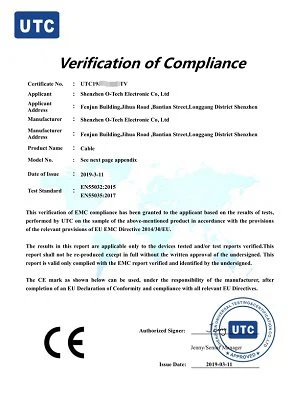
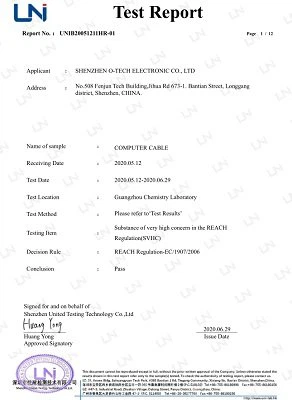
Certifications

FAQ
As one of the most professional mini usb cable manufacturers and suppliers in China, we're featured by quality products and competitive price. Please rest assured to buy or wholesale bulk mini usb cable made in China here from our factory.
MINI USB EXTENSION CABLE, usbc to mini usb adapter, ANGLED MINI USB CABLE